The Why: Cloud Audio Is a Smart Home Failure Point
At first glance, Spotify or YouTube Music seem like obvious choices.
I tried both.
Spotify: The Subscription Tax
- 12 EUR/month
- No ownership of media
- Locked into external licensing decisions
- Requires internet connectivity
- Yet another recurring cost
For a core house function, that is architectural debt.
If my lighting does not depend on a subscription, why should my music?
YouTube Music: The Cookie Nightmare
On paper, YouTube Music looks hackable.
In reality:
- Constant cookie authentication issues
- API instability
- Sudden breakage after backend changes
- Random re-logins required
It worked, until it did not.
In a smart home, "sometimes works" is the same as broken.
The Core Problem
Cloud music introduces:
- External authentication layers
- API fragility
- Internet dependency
- Recurring cost
- Latency
That is five failure points for something that should be as reliable as flipping a light switch.
Time for an architectural pivot.
The Pivot: Local-First Audio
Instead of renting access to music, I own it.
High-quality audio files are stored directly on the laptop SSD where Home Assistant runs.
No cloud.
No auth.
No API.
No subscription.
Just files.
The moment I moved music storage local, the entire architecture simplified.
Core Component: Music Assistant
If Home Assistant is the operating system of the house, Music Assistant is the operating system of music inside Home Assistant.
It provides:
- Media indexing
- Library management
- Multi-room playback
- Player grouping
- Fast local streaming
Installation Overview
Inside Home Assistant:
-
Install Music Assistant from HACS or the official add-on repository.
-
Define a local media directory:
media_dirs: music: /media/music -
Point it to the SSD folder where audio files are stored.
-
Let it scan and index your library.
-
Expose your media players.
Done.
No OAuth dance.
No refresh tokens.
No cloud handshake.
Hardware Stack: Solving the Speaker Problem
Google Home Minis are everywhere in my house. Cheap, stable, and well-supported.
But their built-in speakers are weak.
So I introduced a hardware passthrough layer.
Each Google Home Mini is paired via Bluetooth to a high-quality external speaker:
- Google Mini = network endpoint
- Bluetooth speaker = real audio output
- Mini default output = paired speaker
This solves the tiny-smart-speaker limitation without replacing hardware.
Logical Grouping: Whole House Mode
In the Google Home app:
- I created a "Whole House" group
- Added all Google Minis
- Exposed the group to Home Assistant
Now Home Assistant sees:
media_player.whole_houseOne entity, every room.
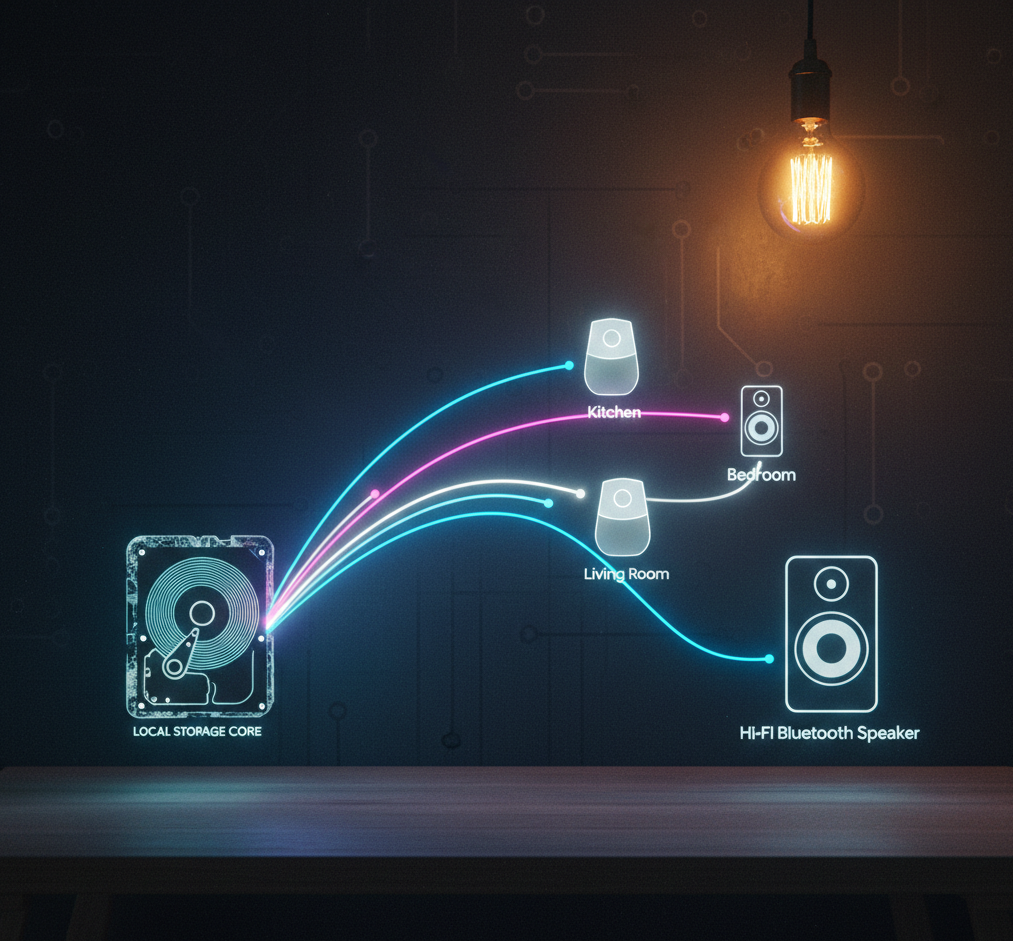
Architecture Overview
Here is the actual data flow:
What This Means
- Audio never leaves the house
- Streaming happens over local Wi-Fi
- Google devices act as distribution nodes
- Bluetooth handles the final audio output stage
It is simple. That is the point.
The Result: Zero Bottlenecks
After the pivot:
Instant Response
Press play and music starts immediately.
No API call.
No authentication delay.
No buffering.
Zero Subscription Fees
- No 12 EUR/month Spotify tax
- No platform lock-in
- No licensing anxiety
Music becomes infrastructure, not a service.
100 Percent Uptime (Even Offline)
If the internet goes down:
- Lights still work
- Automations still work
- Music still works
Because it is local.
That is the Bare Metal philosophy.
Key Architectural Lessons
- Eliminate recurring cost where possible
- Remove cloud dependencies for core house functions
- Use hardware passthrough instead of replacing entire stacks
- Own your media
- Treat music as infrastructure, not entertainment
Final Thought
Cloud services are convenient until they are not.
If your house depends on someone else's server to play a song in your kitchen, you do not own your system. You are renting it.
This multi-room setup is not flashy.
It is not trendy.
But it is fast.
It is reliable.
And it works every single time.
In Bare Metal Home, that is the only metric that matters.